
Project Dashboard
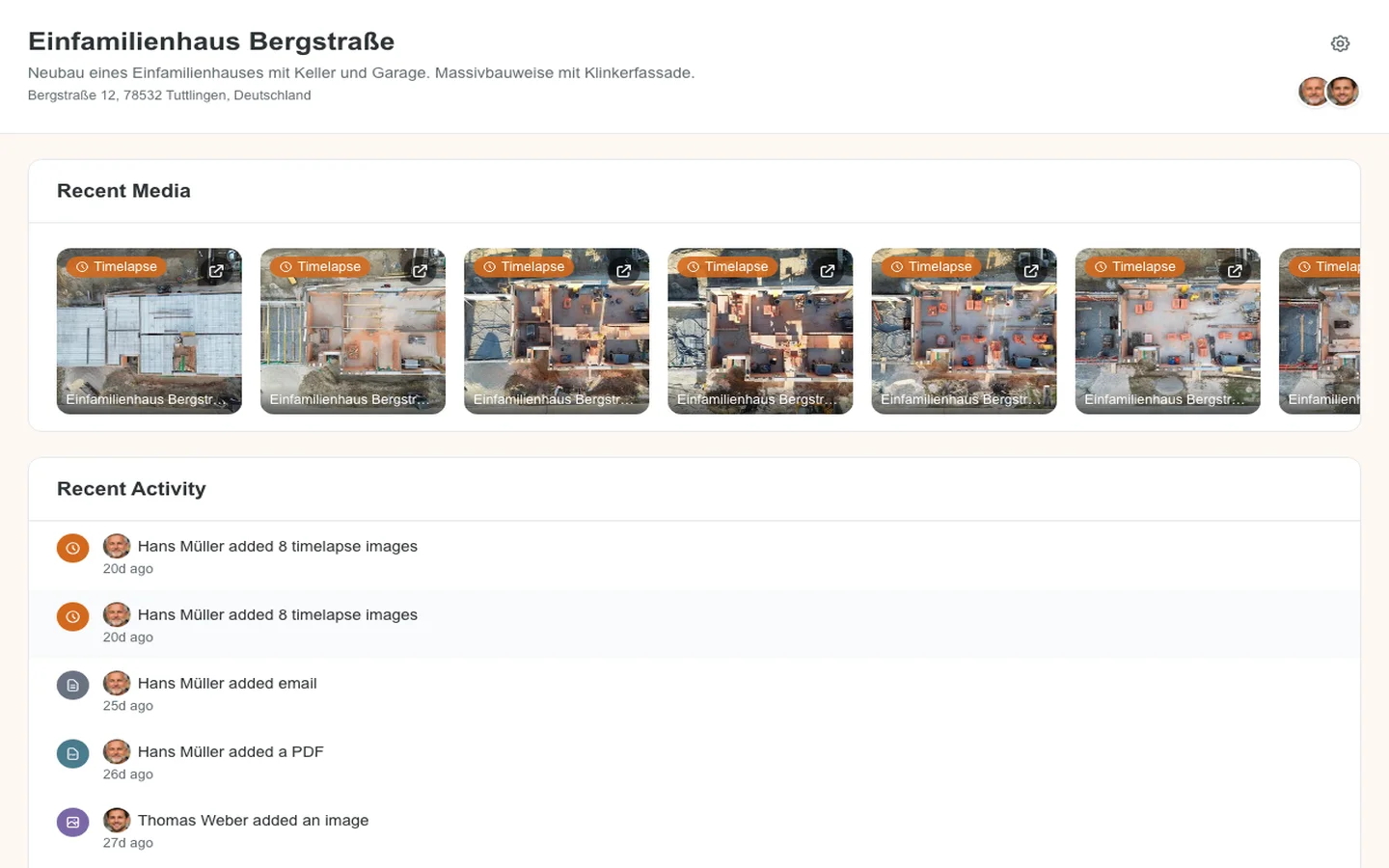

Know What’s Happening Across All Your Projects
Construction managers juggle multiple projects simultaneously. Checking the status of each project shouldn’t require opening separate apps, scrolling through chat groups, or making phone calls.
How the Project Dashboard Works
Every project in Site Diary AI has a dedicated dashboard that gives you a complete overview at a glance.
Open any project and immediately see: recent photos, the latest activity from your team, key statistics, and quick access to all project features. No clicking through menus or searching for information.
Everything You Need in One View
- Recent media: Latest photos and videos uploaded by your team
- Activity feed: See who added what, and when
- Project statistics: Total entries, team members, and project duration
- Weather overview: Current conditions at the project location
- Quick actions: Jump directly to the timeline, reports, or timelapse gallery
Key Benefits
- Instant project status: Know what’s happening without asking your team
- Manage multiple projects: Switch between project dashboards in one tap
- Mobile access: Check project status from anywhere, on any device
- Real-time updates: See new entries the moment they’re added
- Reduced communication overhead: Less “What’s the status?” messages and calls
Use Cases
Morning Status Checks
Start the day by scanning dashboards across all your projects. Recent photos and activity feeds tell you what was accomplished yesterday and what’s in progress today, without making a single call.
Client Updates
When a client asks “How’s the project going?”, open the dashboard and share a screenshot or walk them through recent progress. No preparation needed.
Project Handoffs
When transitioning a project to a new team member, the dashboard provides an instant overview of where things stand: recent activity, team members involved, and documentation history.
Frequently Asked Questions
What information does the dashboard show?
The dashboard shows recent photos, an activity feed with latest entries, project statistics including total entries and team members, weather conditions, and quick access to all project features.
Can I see multiple projects at once?
Yes. Your home screen shows all your projects with their latest activity. You can switch between project dashboards with a single tap.
Is the dashboard available on mobile?
Yes. The project dashboard is fully responsive and optimized for mobile devices, so you can check project status from anywhere.
How often is the dashboard updated?
The dashboard updates in real-time. As soon as a team member adds a new entry, it appears in the activity feed and recent media section.
Explore More Features

Site Diary Timeline
Document daily construction progress with photos, videos, voice memos, and notes in Site Diary AI's intuitive chat-style timeline.

AI Daily Reports
Generate professional construction daily reports automatically with AI. Weather data, photo descriptions, and summaries included.

Project Collaboration
Invite team members, clients, and subcontractors to your construction projects. Assign roles and control access permissions.